
One weekend I decided to step well outside my usual territory of Ruby, Elixir and Emacs. I had never written a game, never touched Roblox, and had never seen a line of Luau, which felt like reason enough to try. And I find it hard to resist the idea of building something you can actually play, not just run.
The result is Neon Shatter, an endless neon brick-breaker. You can play it on Roblox.
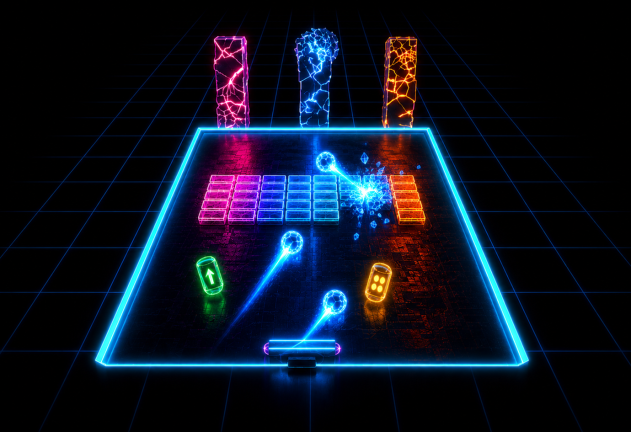
What I didn’t expect was how much it would feel like a normal software project, down to the tooling and a couple of lessons I thought I already knew.
It’s a real codebase
My mental image of Roblox was a kid-friendly editor where you drag blocks around and glue a bit of script on top. That image is wrong, or at least it’s only half the story.
You can work entirely from your own editor. Rojo
watches a src/ tree on disk and syncs it live into Roblox Studio. Studio
becomes the runtime and the viewport, while the actual code lives in files,
under Git, like anything else.
The mapping between the folder tree and the Roblox data model is a small JSON file:
{
  "name": "neon-shatter",
  "tree": {
    "$className": "DataModel",
    "ReplicatedStorage": {
      "$className": "ReplicatedStorage",
      "Shared": { "$path": "src/shared" }
    },
    "ServerScriptService": {
      "$className": "ServerScriptService",
      "Server": { "$path": "src/server" }
    },
    "StarterPlayer": {
      "$className": "StarterPlayer",
      "StarterPlayerScripts": {
        "$className": "StarterPlayerScripts",
        "Client": { "$path": "src/client" }
      }
    }
  }
}
Three folders: shared modules both sides can require, server scripts, and
client scripts. That split turns out to matter a lot, and I will come back
to it.
Then there is the language. Luau is a typed dialect of Lua that Roblox
maintains. Every file in the project starts with --!strict, and the type
checker caught most of my silly mistakes before Studio ever ran the code,
the same way a decent type checker does anywhere else.
Around the language sits a toolchain that would look at home in any repository: StyLua for formatting, selene for linting, Wally for packages, Rokit to pin the exact versions of all of them, and Lune to run tests. None of it is bundled with Roblox. It’s the community rebuilding the conveniences we take for granted elsewhere.
The server owns everything
The single most useful thing I learned is that a Roblox place is a client-server system, and you’re much better off treating it like one from the first line.
Anything the client can compute, the client can lie about. A player running a modified client could tell the server the ball is wherever they want it to be. So in Neon Shatter the server owns all the state: it builds each arena, runs a fixed-step physics loop, and resolves every collision. The client sends intent and renders what the server reports back, nothing more.
Steering the paddle with the keyboard is a good small example. The client never moves the paddle. It only tells the server which direction is held, and only when that changes:
local function setKeyboardDir(dir: number)
	if dir == keyboardDir then
		return
	end
	keyboardDir = dir
	if dir ~= 0 then
		controlMode = "keyboard"
	end
	setPaddleDir:FireServer(dir)
end
The server integrates that direction each step and clamps the result to the play area, so the paddle can never leave the arena whatever a client claims:
function Paddle.clampX(
	requestedX: number,
	arenaCenterX: number,
	halfPlayWidth: number,
	halfPaddleWidth: number
): number
	local minX = arenaCenterX - halfPlayWidth + halfPaddleWidth
	local maxX = arenaCenterX + halfPlayWidth - halfPaddleWidth
	return math.clamp(requestedX, minX, maxX)
end
The two sides talk only through named RemoteEvents, gathered in one shared
module so both ends agree on the vocabulary: SetPaddleDir, LaunchBall,
BrickBroken, FireLaser, and so on. The server creates them on startup;
the client waits for them and fires intent across.
None of this is specific to Roblox. It’s the same discipline you want in any networked application: never trust the client, validate on the server. A game just makes it vivid: get that boundary wrong and a client can slide its paddle straight out of the arena.
Making the ball behave
The ball gave me the most trouble, and it failed in the funniest way.
The obvious approach is to move the ball a little each frame, then check whether it now overlaps a brick. At low speed that’s fine. Crank the speed up and it falls apart: between two frames the ball jumps clean over a thin brick, touches nothing on any single frame, and sails out the back of the arena. The first time I watched a ball teleport straight through a wall I laughed out loud, then went looking for the fix.
The fix is continuous collision. Instead of testing positions, you test the movement: treat the step from the old position to the new one as a segment, and ask when along that segment the ball first enters a box. That’s a swept axis-aligned bounding box test, solved with the slab method: for each axis you compute the interval of time the segment spends inside the box’s extent, intersect the intervals, and the earliest entry that survives is your hit, along with the face it hit.
Once you have the hit and the surface normal, the bounce is a three-line reflection:
function Physics.reflect(vx: number, vz: number, nx: number, nz: number): (number, number)
	local dot = vx * nx + vz * nz
	return vx - 2 * dot * nx, vz - 2 * dot * nz
end
The whole step is one function that moves the ball, finds the nearest thing
it hits (brick or paddle), reflects off it, and returns a short status
string: "brick", "paddle", "wall", "lost", or "alive". The caller
reacts to the tag rather than re-deriving what happened. It kept the loop
easy to reason about, even once piercing balls and multi-ball were in the
mix.
Testing a game without the engine
This is the piece I enjoyed most, and the reason the rest stayed manageable.
Games are awkward to test because so much of them lives inside the engine: rendering, input, sound, data stores. You can’t easily run any of that in CI.
But a large slice of a game is not engine-bound at all. The collision maths,
the difficulty curve, the brick layout, the power-up rules are all plain
functions: numbers in, numbers out. I kept them in dependency-free modules
with no require and no Roblox globals, so they run with no engine
whatsoever.
The difficulty curve is a clean example. Every value the game escalates is just arithmetic on the current level:
--!strict

local Difficulty = {}

function Difficulty.ballSpeed(
	level: number,
	baseSpeed: number,
	perLevelFactor: number,
	maxSpeed: number
): number
	return math.min(baseSpeed * (1 + (level - 1) * perLevelFactor), maxSpeed)
end

function Difficulty.rows(level: number, baseRows: number, maxRows: number): number
	return math.min(baseRows + (level - 1), maxRows)
end

function Difficulty.maxHp(level: number, cap: number): number
	return math.min(1 + math.floor((level - 1) / 2), cap)
end

return Difficulty
Because it’s pure, I can pin its behaviour exactly. Lune runs the suite headless, straight from a terminal:
local Difficulty = require("../src/shared/Difficulty")

return function(suite)
	-- ballSpeed: level 1 is the base; later levels scale; capped
	suite:approx(Difficulty.ballSpeed(1, 45, 0.08, 90), 45, 1e-6, "level 1 speed is base")
	suite:approx(Difficulty.ballSpeed(3, 45, 0.08, 90), 52.2, 1e-6, "level 3 speed scales")
	suite:approx(Difficulty.ballSpeed(100, 45, 0.08, 90), 90, 1e-6, "speed is capped")
	-- rows and maxHp are checked the same way
end
The collision code gets the same treatment, and here it really pays off. A
swept test is exactly the kind of geometry that is easy to get subtly wrong
and impossible to eyeball. So I nail down concrete cases: a ball crossing
from x = 0 toward a box centred at x = 5 with half-width 1 should first
touch its left face at 40% of the way, with a normal pointing back along
-x:
local t, nx, nz = Physics.sweptAABB(0, 0, 10, 0, 5, 0, 1, 1)
suite:approx(t :: number, 0.4, 1e-6, "swept +x entry fraction")
suite:eq(nx, -1, "swept +x normal points -x")
suite:eq(nz, 0, "swept +x normal has no z")
Even the input rules are pure where they can be. Deciding whether a touch is a tap (launch the ball) or a drag (move the paddle) is not engine plumbing, just a rule about pixels and time:
function TouchMath.isTap(
	movementPixels: number,
	elapsedSeconds: number,
	maxPixels: number,
	maxSeconds: number
): boolean
	return movementPixels <= maxPixels and elapsedSeconds <= maxSeconds
end
One command, lune run tests/run.luau, verifies all of it in milliseconds.
Everything that really needs the engine, I check by playtesting in Studio.
Drawing that line, with pure logic on one side and engine glue on the other,
is the thing I would keep on any future project of this kind.
Fair by construction
Power-ups were where design started to matter more than code. Drop a rare laser every few seconds and the game is trivial. Never drop one and it’s joyless. I wanted variety without chaos, and I wanted the balance to be an explicit rule.
So the selection is a weighted roll with two kinds of cap: a per-type limit and a global limit on how many power-ups can be live in a wave. If the wave is already saturated, nothing drops; otherwise only the types still under their own cap are eligible, and the roll is weighted among those:
function PowerUps.pickType(
	roll: number,
	weights: { [string]: number },
	caps: { [string]: number },
	counts: { [string]: number },
	totalCap: number
): string?
	local total = 0
	for _, kind in PowerUps.Types do
		total += counts[kind] or 0
	end
	if total >= totalCap then
		return nil
	end

	local eligible = {}
	local weightSum = 0
	for _, kind in PowerUps.Types do
		local weight = weights[kind] or 0
		if weight > 0 and (counts[kind] or 0) < (caps[kind] or 0) then
			table.insert(eligible, kind)
			weightSum += weight
		end
	end
	if weightSum <= 0 then
		return nil
	end

	local target = roll * weightSum
	local accumulated = 0
	for _, kind in eligible do
		accumulated += weights[kind]
		if target < accumulated then
			return kind
		end
	end
	return eligible[#eligible]
end
roll is a number in [0, 1) the caller passes in. That one detail keeps
the function pure and, again, trivially testable: feed it a fixed roll and
assert exactly which type comes out. Randomness lives at the very edge, where
the server calls it; the rule itself is deterministic.
Persistence that is allowed to fail
The last surprise was persistence, which had me writing more defensive code than I expected from a game.
Best scores are saved to an OrderedDataStore, Roblox’s sorted key-value
store, which is what makes the top-scores board possible. The catch is that
data stores only work when the place belongs to a published experience with
API access enabled. In a plain Studio session they’re simply not there, and
every call throws.
The answer is to treat persistence as best-effort. Every store access is wrapped, resolved once, and cached, and the whole thing degrades to zero instead of crashing the game:
local stores: { [string]: OrderedDataStore } = {}
local resolved: { [string]: boolean } = {}
local function getStore(name: string): OrderedDataStore?
	if not resolved[name] then
		resolved[name] = true
		local ok, store = pcall(function()
			return DataStoreService:GetOrderedDataStore(name)
		end)
		if ok then
			stores[name] = store
		end
	end
	return stores[name]
end
Reads and writes follow the same shape: if the store is missing, a read
returns 0 and a write silently does nothing. The leaderboard panel just
stays empty, and nothing else breaks. It let me develop the whole game
offline in Studio and only turn on real persistence in the published build.
There’s one design wrinkle I’m particularly proud of. Some players buy an extra starting life, or revive after a loss. Those runs are not comparable to a clean run, so scores set with a boost go to a separate Boosted board, and the Pure board stays honest. Two ordered stores and one rule about which board a run lands on, and the ranking that matters keeps its meaning.
It got out of hand
“Just to try” was meant to be a paddle and a ball.
Then the bricks had to break with a satisfying burst, which made me want a score to go with it, then a combo multiplier to make the score interesting, then power-ups worth chasing. The power-ups needed rules to stay fair, a finished run called for a leaderboard, and the leaderboard dragged persistence in behind it.
By the time I stopped, it had multi-hit bricks, a handful of power-ups (including a laser you fire and a reverse-controls trap you want to dodge), a combo multiplier, two persistent score boards, a cosmetics shop, comfort passes, a revive, and mobile controls. It reached a 1.0 I am happy to call released.
I planned none of that up front. Each feature led to the next, and because the codebase stayed small, typed, and tested, adding one more was never scary. That came straight from the pure-module split and the type checker doing their jobs.
What I take away
I set out to poke at an unfamiliar platform for a weekend and came away with real respect for it. Roblox is a genuine engine with a proper language, a sane client-server model, and community tooling good enough to work the way I already like to work: files under Git, types on, tests green, small functions I can hold in my head.
The part I didn’t plan for is that I still open it to play. The shatter is stupidly satisfying, and every so often I forget I’m meant to be testing and just chase the combo counter for a while. For a weekend experiment, that feels like a win.
If you’ve been curious about it, the barrier is lower than it looks.
Install Rojo, point it at a src/ folder, and write typed Luau in the editor
you already use. Studio handles the rest.
And if you would rather just play, Neon Shatter is right here.
Have comments or want to discuss this topic?
Send an email to ~bounga/bounga.org-discuss@lists.sr.ht